
Google Maps is reportedly testing a new visual feature that makes maps easier to read and navigate. The High-Visibility Mode coming soon may change the colour scheme of roads, parks, water bodies, and other geographical features so you can see what’s around you more clearly.
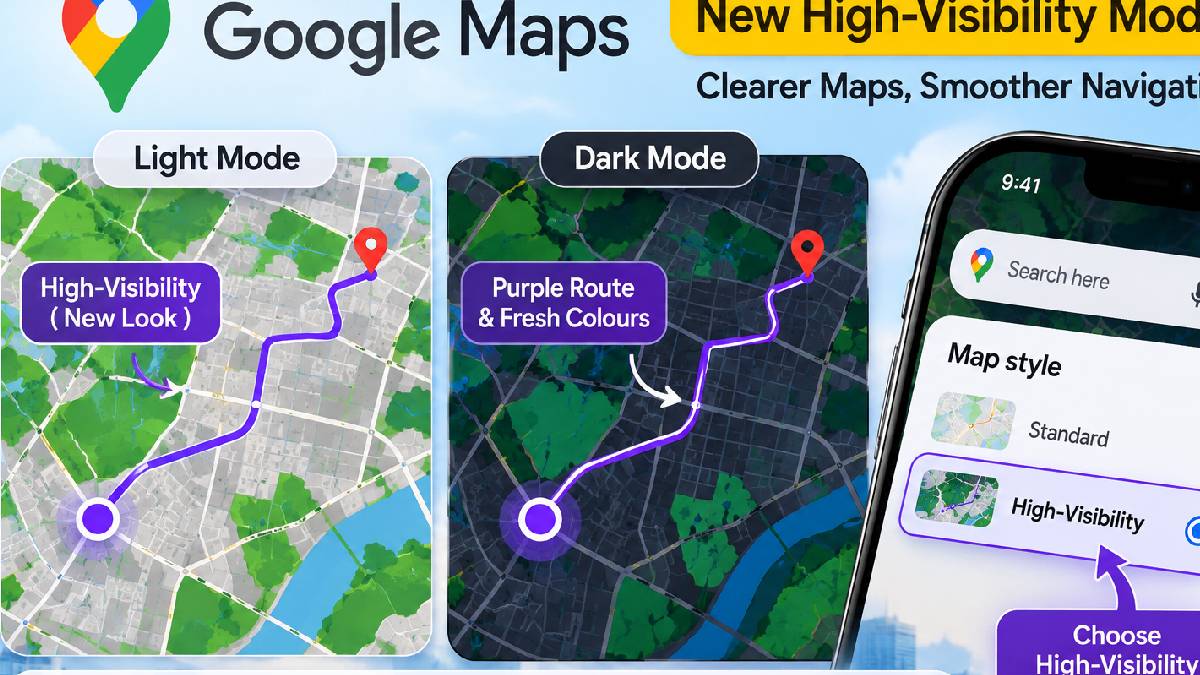
The feature is said to be in a newer version of Android Maps and not yet available to everyone. The new design could be an alternative to the Standard map style (changes to both Light Mode and Dark Mode).
Google hasn’t announced a release date for the feature yet.
What Is Google Maps High-Visibility Mode?
High-Visibility Mode would be a new map appearance option that could enable users to toggle between Standard design and one with more visual separation.
Under the new design, different geographical elements may be displayed in contrasting colours so that users can identify roads, green spaces, water bodies, and their current location more easily.
The feature is about clarity (not change) of navigation; people would still get directions, estimated travel times and turn-by-turn navigation as usual.
What Changes in Light Mode?
Google Maps’ current Light Mode uses white, green, brown and other shades to represent different areas.
The High-Visibility design reportedly has a few colour changes:
- Green areas could appear darker green.
- Some white and brown areas could be replaced with different shades of grey.
- The current blue location indicator could change to purple.
- Roads and surrounding geography could be more visually distinct.
The new colour palette may make it easier to find important map details (e.g. complex urban areas) quickly when looking at the map.
Dark Mode Could Get a New Look
The changes will also apply to Dark Mode.
The bluish-dark background could be replaced by a darker, almost black appearance. The navigation route (blue or cyan shades) could instead appear purple.
Water bodies, green spaces, and other map elements may also be coloured differently to make them stand out against the darker background.
The new design could make Google Maps appear quite different from how it is now (keeping the navigation functionality) but also give it a completely new look.
Will Navigation Features Change?
According to the report, High-Visibility Mode is a visual redesign rather than a completely new navigation system.
There’s no indication at this point that the feature will change route planning, turn-by-turn directions, ETA estimates, traffic information, or other core navigation tools.
Instead, it is to improve how geographical information is displayed on the screen.
Users may be able to choose the map appearance that best fits their preferences, screen visibility, and viewing conditions.
Who Could Benefit From the New Feature?
The new colour scheme might help users who struggle to see some map details with the current interface.
People who live in unfamiliar neighbourhoods, busy urban roads or complicated junctions may find contrasting colours useful for identifying roads and surrounding areas.
The benefits could be different depending on screen brightness, display quality, lighting conditions, and visual taste of each person. The usefulness will become more apparent when the feature is widely available.
When will Google Maps high-visibility mode launch?
The feature has reportedly been spotted in Google Maps Android version 26.48.00.1027729593.
But Google hasn’t announced a rollout date yet. Because the feature is still reportedly being tested, its final design and colour scheme could change before it goes wide.
It may not show up on every Android device immediately, and availability could be determined by Google’s testing and rollout schedule.
The High-Visibility Mode might be useful for people who like to see finer distinctions while navigating. If it were widespread, Google Maps users would have another way to customise the map the way they want to see it.





Comments